
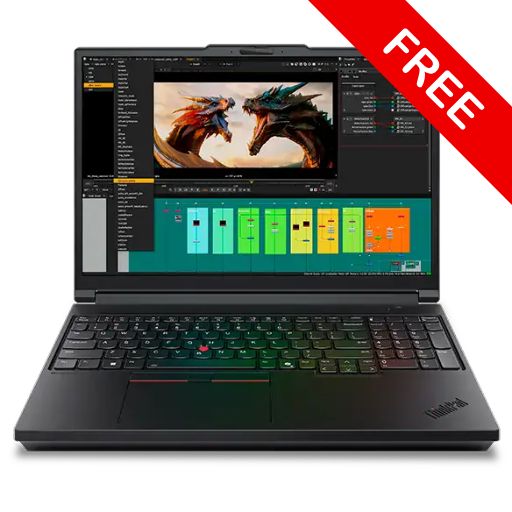
Lenovo has quietly launched a very powerful laptop called the ThinkPad T16g Gen 3. It is a 16-inch mobile workstation that looks like a business laptop on the outside, but inside, it is as strong as a high-end gaming PC. If you are a video editor, 3D artist, engineer, AI developer, or someone who runs heavy software, this laptop can be a great choice for you.
In this article, we will look at every important feature of the ThinkPad T16g Gen 3 in simple words. We will cover the design, display, performance, battery, price, pros and cons, and finally help you decide if this laptop is right for you. This review is based on the official Lenovo specifications and real-world testing reports published after the September 2025 launch.
What is the ThinkPad T16g Gen 3? (Overview)
The ThinkPad T16g Gen 3 is Lenovo’s new AI-ready mobile workstation, launched in September 2025. It is part of the famous “T” series, but the small “g” in the name is important. It means this laptop comes with NVIDIA GeForce RTX graphics cards, which makes it different from the regular ThinkPad P series workstations.
In simple words, Lenovo has mixed business-class durability with gaming-class hardware. This laptop is made for professionals who need extreme performance in every situation, whether it is AI model training, 4K video editing, or CAD designing.
Quick Specifications Table
| Feature | Details |
|---|---|
| Launch Date | September 2025 |
| Display | 16-inch, up to 3.2K Tandem OLED, 500 nits, 120Hz |
| Processor | Intel Core Ultra 5 245HX to Core Ultra 9 285HX |
| Graphics | NVIDIA GeForce RTX 5080 / RTX 5090 Laptop GPU (up to 24GB GDDR7) |
| RAM | Up to 192GB DDR5-5600 (4 SODIMM slots) |
| Storage | Up to 12TB (3x M.2 PCIe slots, one PCIe Gen 5) |
| Battery | 99.9Wh, Rapid Charge (80% in 1 hour) |
| Charger | 180W USB-C GaN |
| Weight | Around 2.54 – 2.6 kg |
| Ports | 2x Thunderbolt 5, 1x Thunderbolt 4, HDMI 2.1, 2x USB-A, 2.5GbE |
| Connectivity | Wi-Fi 7, Bluetooth 5.4, Optional 5G |
| Camera | 5MP with IR + Privacy Shutter |
| OS | Windows 11 Pro |
| Durability | MIL-STD-810H certified |
| Starting Price | Around $2,399 (US) / ₹2,00,000+ in India |
Design and Build Quality
Lenovo has completely redesigned the body of this laptop. Compared to the older ThinkPad P16 Gen 2, the new T16g Gen 3 is almost 500 grams lighter, but the durability is still very strong.
The body is made of magnesium and aluminium, and the top of the base has carbon fiber-reinforced plastic, which hides fingerprints well. The display lid is made of aluminium, so it can show fingerprints sometimes. The full chassis is tested under MIL-STD-810H military standards. This means the laptop can handle dust, drops, vibration, and high or low temperatures without any problem.
The size is 362 x 252 x 15.8 mm, and the weight is around 2.54 kg. It is not a “lightweight” laptop, but it is much better than the older model. You can easily carry it from your office to home, but it is a bit heavy for daily long-distance travel.
The design follows the classic ThinkPad style — matte black finish, the red TrackPoint dot in the middle of the keyboard, and a premium feel that every ThinkPad fan loves.
Display: The Magic of Tandem OLED
The display is one of the strongest points of this laptop. Lenovo gives you three display options to choose from:
- 1920 x 1200 IPS – the basic option for simple users
- 3200 x 2000 Tandem OLED Touchscreen – the best balanced choice with 120Hz refresh rate
- 3840 x 2400 (4K+) IPS – for ultra-detailed work
Tandem OLED is a new technology. It is brighter than normal OLED screens (up to 500 nits peak brightness) and also reduces the burn-in problem. The screen-to-body ratio is 82%, which matches modern laptop standards.
The display comes with Dolby Vision, Eyesafe Certified 2.0, TÜV Rheinland Low Blue Light, and X-Rite factory color calibration. This means you can do color-sensitive work like photo editing, video editing, or graphic design with full confidence. The touchscreen version supports 10-point touch and works with the Lenovo Yoga Pen (sold separately).
One small negative point: the matte touchscreen panel can make images look slightly grainy because of the anti-glare coating.
Performance: CPU and GPU Power
This laptop is a beast when it comes to performance. You can choose from many configurations:
CPU Options (Intel Arrow Lake HX series):
- Intel Core Ultra 5 245HX
- Intel Core Ultra 7 255HX / 265HX
- Intel Core Ultra 9 275HX
- Intel Core Ultra 9 285HX – the flagship chip with 24 cores and 5.5GHz boost speed
The top-end Core Ultra 9 285HX gets about 2920 single-core and 14,499 multi-core scores in Geekbench 6. These numbers are among the best in mobile workstation class.
GPU Options:
- NVIDIA GeForce RTX 5080 Laptop GPU
- NVIDIA GeForce RTX 5090 Laptop GPU – with 24GB GDDR7 VRAM
Here is one important point to know. In detailed testing by Notebookcheck, the RTX 5080 was running only at 105W TGP. This means Lenovo has limited the GPU power a little because of the 180W charger. So in pure raw GPU performance, dedicated gaming laptops like the Legion Pro 7i can be slightly faster. But for AI workloads and professional applications, this GPU is still extremely powerful.
Real-world performance:
- 4K video editing in Premiere Pro – smooth
- Blender 3D rendering – very fast
- AI model inference and local LLMs – the 24GB VRAM of RTX 5090 helps a lot
- Gaming at 4K resolution – RTX 5090 model easily delivers 60+ FPS on high settings
RAM and Storage: A Future-Proof Setup
This section is the biggest plus point for workstation users.
RAM: The laptop has 4 SODIMM slots that support DDR5-5600 memory. You can install up to 192GB RAM in total. This is amazing for AI developers, virtual machine users, and 3D artists who handle huge files.
Storage: It has 3 M.2 PCIe slots, and one of them supports PCIe Gen 5.0 x4, which can reach read speeds of around 16GB/s. You can configure up to 12TB total storage.
The best part is that both RAM and SSD can be upgraded by the user. You can buy cheaper memory or storage in the future and install it yourself. This freedom is not available in Apple MacBooks and many other premium laptops.
Battery Life and Charging
The laptop comes with a 99.9Wh battery, which is the maximum size allowed on airlines. For charging, it includes a 180W USB-C GaN charger that supports PD 3.1 and can charge the laptop to 80% in just 1 hour thanks to the Rapid Charge feature.
Real-world battery life:
- Office work and web browsing – around 5 to 7 hours
- Video playback – 6 to 8 hours
- Heavy gaming or rendering – 1.5 to 2 hours
The battery life is average. With such powerful hardware, you cannot expect very long battery life. The good news is that the older SlimTip charging port has been removed. Now you only charge through USB-C, which is much more convenient when travelling.
Ports and Connectivity
The ThinkPad T16g Gen 3 has many ports for connecting different devices:
Left Side:
- 1x USB-A 3.2 Gen 2 (10 Gbps)
- 1x USB-C 4.0 with Thunderbolt 4 (40 Gbps, DisplayPort 2.1, 180W PD)
- SD Express 8.0 card reader (super fast – over 1.4 GB/s)
Right Side:
- 3.5mm audio jack
- 1x USB-A 3.2 Gen 2 (Always On)
- Kensington Nano Security slot
Rear:
- 2.5 Gbps Ethernet port
- HDMI 2.1 (supports 8K at 60Hz)
- 2x USB-C 4.0 with Thunderbolt 5 (80 Gbps)
Wireless:
- Wi-Fi 7 (Intel BE200)
- Bluetooth 5.4
- Optional 5G modem (Sub-6 GHz)
For photographers, the SD Express 8.0 reader is a big advantage because it transfers files extremely fast. Thunderbolt 5 ports are very future-proof and let you connect multiple 8K external displays.
Keyboard, Touchpad and Camera
ThinkPad keyboards are known as the best in the world, and the T16g Gen 3 keeps this tradition alive. It has a 6-row spill-resistant keyboard with a full numeric keypad and a new dedicated Copilot key for AI features. The keys have LED backlight, and the key travel is comfortable, which makes long typing sessions easy on your hands.
The famous TrackPoint (the red nub in the middle of the keyboard) is still there. Below it, you get a glass-like Mylar touchpad (67 x 115 mm) with 3 physical buttons. The touchpad is smooth and accurate.
Camera: A 5MP camera with IR sensor (Windows Hello compatible) is included, along with a physical privacy shutter. There is also a smart feature called Computer Vision Human Presence Detection, which automatically locks the laptop when you walk away. This is great for privacy and security.
Audio: The laptop has stereo speakers (2W x 2) with Dolby Atmos support. There is a dual-microphone array with Dolby Voice technology, which gives clear audio in online meetings and calls.
Security Features (ThinkPad Reliability)
For business users, this laptop focuses a lot on security:
- Fingerprint reader built into the power button
- IR camera for Windows Hello face login
- Privacy shutter on the webcam
- dTPM 2.0 chip for hardware-level encryption
- Smart Card reader (optional)
- Kensington Nano security slot
- Intel vPro platform support for enterprise management
- Complete ThinkShield security suite
Price and Variants (India and Global)
The price is high because this is a premium workstation:
Global Pricing:
- Base configuration (Core Ultra 5, RTX 5080): around $2,399
- Mid-range (Core Ultra 7, RTX 5080, 32GB RAM, 1TB): around $3,500 to $4,000
- Top variant (Core Ultra 9 275HX, RTX 5090, 64GB RAM, OLED): around $5,600
- Maxed-out (Core Ultra 9 285HX, RTX 5090, 128GB RAM, 4TB): around $6,129
India Approximate Price:
- Starting price: ₹2,00,000 – ₹2,30,000
- Top variant: ₹5,00,000 – ₹6,00,000+
In India, you can buy it from the official Lenovo website, Lenovo Exclusive Stores, and authorized dealers (Amazon, Flipkart business sellers). For a custom configuration, the Lenovo India business channel is the best option.
Note: The final price depends on your region, taxes, and chosen configuration. Always check the latest price on the official Lenovo India website before buying.
Pros and Cons (Honest Opinion)
✅ Pros
- Extreme CPU performance with Intel Core Ultra HX series
- Stunning Tandem OLED display option
- Supports up to 192GB RAM – very future-proof
- 3 M.2 SSD slots with PCIe Gen 5 support
- Thunderbolt 5 ports – cutting edge connectivity
- ThinkPad-class build quality and famous keyboard
- MIL-STD-810H certified durability
- Excellent security features (vPro, ThinkShield, IR camera)
- Optional 5G connectivity for travellers
- Rapid charging (80% in just 1 hour)
❌ Cons
- The 180W charger limits the full power of RTX 5080/5090
- Heavy at 2.5+ kg – not ideal for daily commuters
- Average battery life under heavy workloads
- Expensive – starting price is over ₹2 lakh
- Matte OLED touchscreen can look slightly grainy
- No SlimTip charging port (only USB-C now)
- Fingerprints visible on the aluminium lid
Who Should Buy the ThinkPad T16g Gen 3?
This laptop is perfect for you if you are:
- A video editor or filmmaker who works with 4K-8K footage
- A 3D artist or animator using Blender, Maya, or 3ds Max
- An AI developer or ML engineer running local model training
- A CAD or engineering professional using AutoCAD, SolidWorks, or Revit
- A software architect running multiple virtual machines and containers
- A data scientist working with large datasets
- A power user who wants desktop-class performance in a laptop
This laptop is NOT for you if:
- You only do simple office work, browsing, or light tasks
- You have a limited budget (better options exist between ₹50k-1L)
- You want a lightweight, portable laptop (Lenovo Yoga or MacBook Air is better)
- You only want a gaming laptop (Legion Pro 7i gives better value)
ThinkPad T16g Gen 3 vs Competitors
| Laptop | Main Strength | Price Range |
|---|---|---|
| ThinkPad T16g Gen 3 | Workstation + Gaming hybrid with business durability | ₹2L – 6L |
| Dell Precision 7690 | Pure ISV-certified workstation | ₹2.5L – 5L |
| HP ZBook Fury 16 G11 | Strong professional features | ₹2.3L – 5L |
| MSI Vector 16 HX | Better raw gaming performance, cheaper | ₹1.5L – 3L |
| Lenovo Legion Pro 7i | Best gaming value, similar performance | ₹2L – 3.5L |
| MacBook Pro 16 M4 Max | Best battery life and creative apps, no Windows gaming | ₹3L – 5L |
If you want workstation reliability and gaming-class GPU together in one machine, the ThinkPad T16g Gen 3 is a unique option. For pure gaming, the Legion is better. For pure ISV-certified workstation use, the Dell Precision is better.
FAQs (Frequently Asked Questions)
Is the ThinkPad T16g Gen 3 good for gaming?
Yes, with the RTX 5080 or 5090 GPU, it performs very well in games. However, for pure gaming, the Legion Pro 7i gives better value because its GPU power is not limited.
How much RAM can I upgrade to?
You can install up to 192GB of DDR5-5600 RAM using 4 SODIMM slots (4x 48GB modules).
How much battery backup does it give?
Around 5 to 7 hours in normal use and 1.5 to 2 hours under heavy load. The 99.9Wh battery supports rapid charging.
Is this laptop available in India?
Yes, you can order it through the official Lenovo India website and authorized partners. Custom configurations are available.
Which display option is the best?
The 3.2K Tandem OLED touchscreen offers the best balance of color, brightness, and refresh rate. It is highly recommended for color-critical work.
Is this laptop optimized for AI tasks?
Yes, fully. The Intel Core Ultra HX has an NPU, the RTX GPU has Tensor cores, and Lenovo officially calls it “AI-Ready.” It is excellent for local LLM inference, Stable Diffusion, and ML training.
Does it come with warranty service in India?
Yes, Lenovo has a wide service network in India. Premium support packages are also available for mobile workstations.
What is the weight of the laptop?
Around 2.54 to 2.6 kg. It is 500g lighter than the previous generation but still not in the ultraportable category.
Final Verdict: Should You Buy It?
The Lenovo ThinkPad T16g Gen 3 is a specialized professional tool. This laptop is made for people who need extreme power on a reliable, durable, and secure platform.
Rating: 4.3 / 5
| Category | Score |
|---|---|
| Build Quality | 4.5/5 |
| Display | 4.5/5 |
| Performance | 4.3/5 |
| Battery | 3.5/5 |
| Keyboard | 4.7/5 |
| Value for Money | 3.8/5 |
| Overall | 4.3/5 |
If your work involves video editing, 3D rendering, AI development, engineering simulation, or heavy software and your budget is between ₹2-5 lakh, this laptop is a solid investment. But if you mainly do regular office work or just want a gaming laptop, you should look at cheaper and more focused options.
The combination of ThinkPad legacy, modern AI hardware, and professional features is quite rare in the market. Lenovo has made a small compromise with the 180W power supply, but everything else is top-class.
Disclaimer
This review is based on the official Lenovo specifications, third-party reviews from sources like Notebookcheck, TechRadar, and LaptopMedia, and other publicly available data. Prices and availability may change over time. Always check the latest information on the official Lenovo India website before buying.
